Neither full translation nor painful reading: a third way
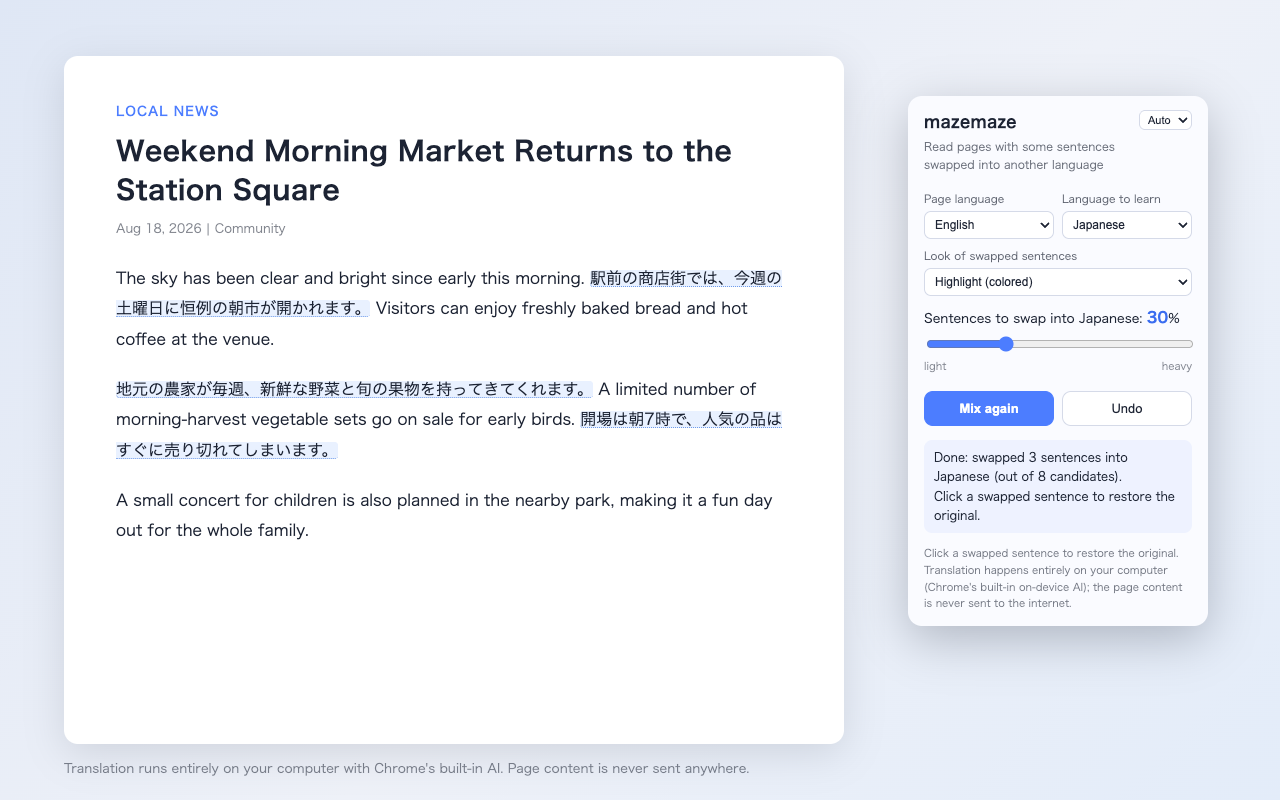
Translating everything teaches you nothing, while reading entirely in a foreign language quickly burns you out with constant dictionary lookups. mazemaze swaps only some sentences into the language you're learning. The surrounding context carries you forward, so you can finish articles without getting stuck.
Features
Click to see the original
Click a swapped sentence to see the original. Never getting stuck is what keeps you going.
4 languages, any direction
Pick the page language and the language to learn freely among Japanese, English, Korean, Traditional and Simplified Chinese. The page language is detected automatically.
10–80% of sentences
Adjust with a slider to match your focus today, from light to heavy.
Zero Setup for Built-in AI
Standard built-in translation requires no API keys or credit card. Just add to Chrome and start reading. Chrome built-in AI runs locally with zero external transmission—safe for work and internal documents (optional Gemini/OpenAI sends chosen text to that provider).
Optional Gemini & OpenAI API Integration
For environments where built-in AI is unavailable, you can optionally connect your own API key. Chosen text is sent directly to that provider, and provider pricing and availability apply.
Seamless Infinite Scroll
As you scroll feeds or long articles, new posts are automatically mixed incrementally. Read smoothly without interruption.
Per-Site Auto Mix & Alt+M
Save your favorite sites for automatic mixing on visit. Toggle between mixed and original text instantly with Alt+M (Option+M).
Reading Log & Streak Tracking
Automatically track words read, 3-choice quiz accuracy %, and daily learning streaks. Visualize your ongoing learning journey like a mileage odometer.
Proficiency Level Benchmarks
Objectively benchmarks the vocabulary level of web content against TOEIC, Eiken, and CEFR standards. Turn casual browsing into test-ready confidence.
Pick the look
Highlight, underline only, or blend in. Light and dark mode supported.
UI in 5 languages
The popup follows your Chrome display language: Japanese, English, Korean, Traditional and Simplified Chinese.
Three steps to start
- Click the iconOn the page you want to read, click the mazemaze icon in the toolbar. The page language is detected automatically.
- Choose language and ratioPick the language you're learning and set the mix ratio with the slider.
- Press "Mix"Some sentences turn into your target language. "Undo" fully restores the page anytime.
3 Everyday Scenarios to Start Learning
No special textbooks required. Turn your daily browsing into effortless reading practice.
Global News & Current Events
BBC / CNN / Reuters / Tech NewsRead English news with 20% translated to your language for context, or mix English into native articles to encounter current phrases. Reduces the need to constantly switch to dictionary apps.
Tech Docs & Official Blogs
GitHub / MDN / Medium / Release NotesWhen reading tech documentation for work or research, translate key portions while keeping the rest in English. Press Alt+M anytime to toggle back to the original text instantly.
Wikipedia & Long-form Articles
Wikipedia / Culture / Substack / ForumsExplore long articles on topics you care about with surrounding context guiding you forward. Turn on the 3-choice original quiz to check the original sentence right on hover.
Use Cases & Stories
Work, fandoms, and casual news skimming. Here is how people shape mazemaze around their everyday habits.

“I mainly use it for release notes. With foreign docs, tabs usually just pile up under "read later." Full machine translation often butchers technical terms, so after trying a few settings, I settled on 30% phrases. I skim through and just click any phrase to check the original English whenever needed. Honestly, I don't even think about whether it's "studying."”

“Translating long posts completely feels so robotic, and all the warm, cute nuance vanishes. But pure Korean is still overwhelming. Mixing in 20% sentences with just underlines is ideal. The surrounding Japanese keeps the context clear, so my idol's favorite phrases click naturally without losing their voice. I hate visual clutter, so the subtle underline style is perfect.”

“I read the BBC, though on busy days it's just the headline and the first paragraph. I used to look up every single unknown word and burned out before finishing an article. Now I mix in Japanese and just browse comfortably. When I miss a quiz question on a phrase I just saw, it stings a little, but the confetti when I get it right is quietly satisfying.”
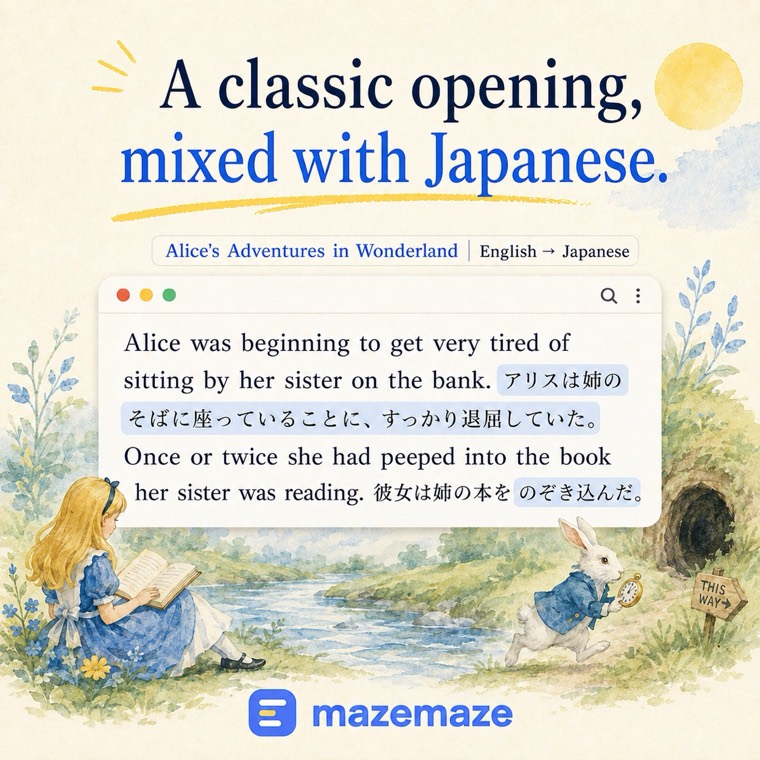
See it on classic openings
Here is what Alice in Wonderland and The Wonderful Wizard of Oz look like with a little Japanese mixed in. Not a side-by-side translation — just a few sentences inside the original flow.

Language Learning & Web Reading Guides
Explore practical methods for learning languages with mazemaze and tips for effective web reading.
【Exam Mastery】Conquer Long Reading Sections in TOEIC, Eiken, and HSK with Mixed Reading
Always running out of time on exams? Learn how mixed reading trains your brain to read long passages in TOEIC, Eiken, and HSK at native speed without getting bogged down.
【Complete Guide】Turn Any Webpage into Study Material with 'Mixed Reading'
Tired of vocabulary flashcards and textbooks? Discover how mixed reading helps you infer meaning from context and effortlessly build language skills during daily web browsing.
Breeze Through Eiken Pre-1 & Grade 1 Reading: Expand Advanced Vocabulary Through Context
Tackling academic passages in advanced exams? Discover how inferring high-level vocabulary in natural web contexts outperforms rote flashcard memorization every time.
Excel in Global Business: 30% Mixed Reading for Industry News in Your Spare Minutes
Level up your executive English without taking evening classes. Discover how a 30% mix on global industry media delivers sharp business vocabulary in spare minutes.
Start reading effortlessly from today's articles.
Built-in translation is 100% Free · No sign-up · Zero external sending (excl. optional API integration)
Add mazemaze to Chrome